What Is SAP Fiori?
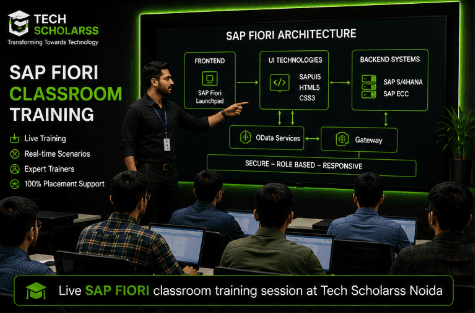
SAP Fiori is the modern, role-based UX layer and design system of the SAP ERP suite, covering SAPUI5 app development, Fiori Elements, OData integration, Launchpad configuration, and app deployment.
Fiori covers custom app development (SAPUI5 apps built from scratch) as well as standard app patterns (Fiori Elements list reports and object pages). Together, these form the presentation layer that end users actually interact with across every SAP implementation.
SAP Fiori Course Syllabus
A complete, job-focused SAP Fiori syllabus is typically organized into the following 12 modules:
- •Module 1 – Introduction to SAP UX & Fiori: Fiori design principles, Fiori vs SAP GUI, app types
- •Module 2 – SAPUI5 Fundamentals: MVC architecture, views/controllers, XML views, data binding
- •Module 3 – SAPUI5 Advanced Concepts: Routing, fragments, event handling, formatters, i18n
- •Module 4 – OData Integration: Service metadata, CRUD operations, model binding, custom services
- •Module 5 – Fiori Elements: List report, object page, annotations, smart controls, flexible column layout
- •Module 6 – SAP Fiori Launchpad: Launchpad Designer, tiles/catalogs, groups/roles, target mapping
- •Module 7 – Custom App Development: App creation via BAS, component configuration, extension points
- •Module 8 – SAP Business Application Studio: BAS setup, dev space, deployment, Git integration
- •Module 9 – Responsive & Adaptive UI: Device adaptation, split app pattern, accessibility
- •Module 10 – Backend Integration & Security: Gateway basics, SAML/SSO, role-based access, CORS
- •Module 11 – Deployment & Transport: ABAP repository deployment, BTP cockpit, transport requests
- •Module 12 – Projects & Placement Preparation: 7 live Fiori app projects, resume and interview prep
This module structure mirrors the curriculum followed on the main course page. View curriculum →
SAPUI5 Fundamentals
SAPUI5 fundamentals are the foundation of any Fiori developer's skill set — understanding MVC architecture, views, controllers, and data binding. A good syllabus spends significant time here since these fundamentals are where most new Fiori developers get their first real hands-on exposure to building a working app.
OData Integration
OData integration governs how a Fiori app talks to real SAP backend data — service metadata, CRUD operations, and model binding. This is tested frequently in interviews since it requires understanding both the technical binding syntax and how backend services expose business data.
Fiori Elements & Launchpad
Fiori Elements covers building list report and object page apps using annotations rather than heavy custom coding, while the Launchpad module covers tiles, catalogs, groups, and target mapping — the role-based home screen that organizes every app a user can access. This combination is a common scenario-based interview topic since real implementation work often involves configuring standard app patterns quickly.
Want the Full SAP Fiori Curriculum?
See the detailed module-wise curriculum, live project list, and batch timings on our main course page.
Explore SAP Fiori Course in Noida →SAP Fiori & S/4 HANA Integration
Modern Fiori development is increasingly built around S/4 HANA-native OData services and SAP BTP extensibility rather than classic custom-only development alone — understanding how they connect is often what separates a strong candidate from an average one.
- •Fiori + S/4 HANA OData Services: Bind apps to live, real-time backend data models
- •Fiori + SAP BTP: Extend standard Fiori apps and build custom cloud apps
- •Fiori + Launchpad Administration: Manage roles, catalogs, and access for a full S/4 HANA landscape
Practical SAP Fiori Projects
Modules alone don't prepare you for interviews — real app-development projects do. A good SAP Fiori program includes hands-on project work such as building a list report and object page app, integrating a custom app with an OData service, configuring a full Launchpad, and building a responsive master-detail app.
The most valuable projects are the ones that combine custom theming with a full deployment to the ABAP repository, since that's where most real-world implementation work — and most interview questions — actually happen.
SAP Fiori Course Duration
Covering all 12 modules properly, along with hands-on app-building practice and project work, typically takes 5–6 months when taught progressively. Shorter crash courses exist but usually compress or skip the Fiori Elements and Launchpad modules, which limits how job-ready you are at the end.
Who Should Learn SAP Fiori?
This syllabus works well for B.Tech, BCA, MCA graduates, and frontend/web-development professionals, since the module structure closely follows web-development concepts they've already studied. UI/UX designers moving into SAP consulting, and working professionals upgrading from classic SAP GUI transactions, also fit well into this curriculum.
If you're from a non-technical background, look for a course that spends time on core HTML, CSS, and JavaScript fundamentals in Module 2 before moving deeper into SAPUI5-specific development.
SAP Fiori Career Opportunities
This syllabus maps directly to roles such as SAP Fiori/UI5 Developer, SAP Fiori Functional Consultant, SAP Fiori Support Consultant, and SAP UX Implementation Consultant. Demand for these roles comes largely from IT consulting firms and SAP implementation partners running app-development and UX projects.
See the full career breakdown here: View curriculum →
How to Choose an SAP Fiori Course
When comparing syllabuses across institutes, it's worth checking a few things directly:
- •Does the syllabus include Fiori Elements in depth, not just custom SAPUI5?
- •Is SAP BTP extensibility covered, or only theory?
- •How many real app-development projects are included in Module 12?
- •Is training delivered on S/4HANA, or only a generic mock backend?
- •Are trainers implementation-qualified, not just SAP-technical trainers?
Frequently Asked Questions
What is included in the SAP Fiori syllabus?+
The syllabus covers 12 modules — SAP UX basics, SAPUI5 fundamentals and advanced concepts, OData integration, Fiori Elements, Launchpad, custom app development, SAP BAS, deployment, and a final projects module.
How long does it take to complete the SAP Fiori syllabus?+
A complete, progressively taught program covering all 12 modules with hands-on practice typically takes 5–6 months.
Does the syllabus include Fiori Elements?+
Yes, Module 5 covers list report and object page applications, annotations, smart controls, and flexible column layout.
Is S/4 HANA and OData covered in the syllabus?+
Yes, Module 4 covers OData basics, service metadata, CRUD operations, and model binding against S/4 HANA services.
Are real projects included in the syllabus?+
Yes, Module 12 includes 7 live Fiori app projects along with resume and interview preparation.
Is this syllabus suitable for non-technical graduates?+
Yes, as long as the course covers core HTML, CSS, and JavaScript fundamentals early on before moving into SAPUI5-specific development.
Where can I check the SAP Fiori course fees?+
See the detailed SAP Fiori course fees guide for what's typically included in the fee across different program types.